 blog
7 Work Order Management Best Practices That Cut Downtime
Last Updated: November 2, 2026
Quick Summary
Work order management best practices start with a standardized intake and template, then rank requests by a three-factor priority score covering safety, asset criticality, and business impact. Combine scheduling, dispatch, and parts checks in one pass, protect planned maintenance with meter-based triggers, and use mobile-first field work with offline access. Track defined KPIs weekly and close the loop with complete, retrievable documentation and monthly audits.
- Keep work order templates to essential fields only; free-text-only notes are the most common template mistake.
- Score each request 1 to 3 on safety, asset criticality, and business impact, then add the scores to set priority.
- Check parts and tools against inventory before dispatch so technicians avoid wasted trips.
- Meter-based triggers fire work orders on actual use like run-hours, cycles, or mileage instead of the calendar.
- Audit ten to twenty randomly sampled closed work orders each month for missing photos, permits, and sign-offs.
Table of Contents
- Why Seven Work Order Management Best Practices Beat Software Alone
- Build a Work Order Template Every Technician Can Fill Out
- Practice 1: Standardize Request Intake and Work Order Submission
- Practice 2: Run a Work Order Prioritization Framework Tied to Safety and Asset Criticality
- Practice 3: Schedule, Dispatch, and Assign Labor and Parts in One Pass
- Practice 4: Separate Preventive from Reactive Maintenance with Meter-Based Triggers
- Practice 5: Make Mobile-First Field Work and Offline Access the Default
- Practice 6: Track Work Order KPIs with Defined Calculations
- Practice 7: Close the Loop with Documentation, Audits, and Compliance Records
- What Seven Work Order Management Best Practices Add Up To
- Frequently Asked Questions
Why Seven Work Order Management Best Practices Beat Software Alone
Most facility teams buy work order management software expecting it to fix their maintenance chaos.
The real problem: software automates a process, but it can't invent one.
Work order management is the system of receiving, prioritizing, assigning, tracking, and closing out maintenance tasks so the right person fixes the right asset at the right time.
Seven habits, in order, that turn maintenance from a fire drill into a managed operation, plus the KPIs and templates that keep them honest.
Build a Work Order Template Every Technician Can Fill Out
A work order template is a fixed set of fields that captures what happened, where, when, and what it cost. Get this right and everything downstream gets easier.
Most templates fail because they ask for too much. Technicians skip fields, write "fixed" in the notes, and the asset history becomes useless. Keep yours to the essentials:
- Asset ID and location (building, floor, room, or unit number)
- Request date and source (who reported it, how)
- Problem description in plain words
Every work order example worth copying has these fields and nothing more.
Watch out: free-text-only notes fields are the most common template mistake. They feel flexible, but they make reporting impossible because no two entries are comparable.
A Filled-In Work Order Example
Here is what a completed routine work order looks like in practice, using the fields above:
| Field | Entry |
|---|---|
| Work order number | WO-2026-0417 |
| Asset ID and location | RTU-3, Building B, roof, above Suite 210 |
| Request date and source | Nov 2, 2026, tenant portal |
| Problem description | "Loud squealing from rooftop unit above our office; started this morning." |
| Priority level | High (score 6: safety 1, criticality 3, business impact 2) |
| Assigned technician and window | J. Alvarez, Nov 3, 8:00-10:00 a.m. |
| Labor hours and parts used | 1.5 hours; blower belt (P/N 42-118), 1 set |
| Completion notes and photos | Belt glazed and cracked; replaced, tensioned to spec, two photos attached |
| Sign-off | J. Alvarez, Nov 3, 2026; tenant notified by portal |
That record answers every question a manager, auditor, or next technician will ask: what failed, what was done, what it cost, and who confirmed it.
A Reusable Intake Checklist
Standardize submissions with a short checklist that requesters and triage staff both use. Print it, embed it in your portal, or attach it to the template:
- Location identified by building, floor, and room or unit number
- Asset ID or tag number recorded, if known
- Problem described in plain language, without jargon
A checklist like this raises the quality of every submission and gives you a defensible standard when a request arrives incomplete.
Review the template and checklist quarterly. Fields nobody fills out are fields you don't need; fields everyone fills out with vague text need a dropdown or a required photo instead.
Practice 1: Standardize Request Intake and Work Order Submission
A single intake channel is the difference between a managed backlog and a pile of texts, voicemails, and hallway conversations. Pick one path for every request, even the urgent ones.
Work order submission should take under a minute. A property manager should be able to report a leaking roof from their phone without hunting for an email address.
Set these rules and hold them:
- One portal, form, or phone line for all requests
- Required fields at submission: location, description, photo
- An automatic confirmation back to the requester
The payoff is a maintenance request log you can actually audit.
Practice 2: Run a Work Order Prioritization Framework Tied to Safety and Asset Criticality
Work order prioritization is the process of ranking requests by consequence, not by who complained loudest. The squeaky wheel approach burns out technicians and leaves critical assets unattended.
Use a simple three-factor score. Rate each request 1 to 3 on safety impact, asset criticality, and business impact, then add the scores:
| Priority Level | Score Range | Response Target | Example |
|---|---|---|---|
| Emergency | 8-9 | Same day, often same shift | Gas smell, elevator entrapment, roof leak over product |
| High | 6-7 | Within 24-48 hours | Cooling failure in a server room, loading dock door stuck |
| Routine | 4-5 | Within the week | Flickering light, worn floor mat |
| Deferred | 3 | Next scheduled cycle | Cosmetic scuffs, paint touch-ups |
Asset criticality is the piece most teams skip. A failed HVAC unit in a warehouse office is an inconvenience; the same failure in a healthcare suite or refrigerated stockroom is a shutdown.
This framework also gives you defensible answers when a regional manager asks why their ticket wasn't first. The score explains it.
Practice 3: Schedule, Dispatch, and Assign Labor and Parts in One Pass
Scheduling and dispatch break down when they happen in separate steps. A technician arrives, discovers the part is in another building, and drives back.
Combine three decisions into one dispatch step:
- Who has the right skill and is closest to the site
- When the window fits the priority and the asset's downtime tolerance
- What parts and tools the job needs, checked against inventory before dispatch
For multi-site portfolios, this is where contractor management gets messy.
A quick check of the U.S. Department of Energy's operations and maintenance guidance reinforces the point: planned, scheduled maintenance consistently outperforms run-to-failure approaches on both cost and equipment life.
Practice 4: Separate Preventive from Reactive Maintenance with Meter-Based Triggers
Preventive maintenance is scheduled work that keeps assets running. Reactive maintenance is the repair after something fails.
The trap is letting reactive work crowd out planned work.
Meter-based triggers remove the guesswork. Instead of "every 90 days," you schedule on actual use:
- Run-hours on compressors and pumps
- Cycle counts on dock doors and elevators
- Mileage on fleet vehicles
A meter-based trigger fires a work order when the asset hits its threshold, not when the calendar says so.
Track your ratio of planned to reactive work. A healthy operation trends toward mostly planned maintenance over time.
Practice 5: Make Mobile-First Field Work and Offline Access the Default
A digital work order that only works at a desk gets filled out days later from memory.
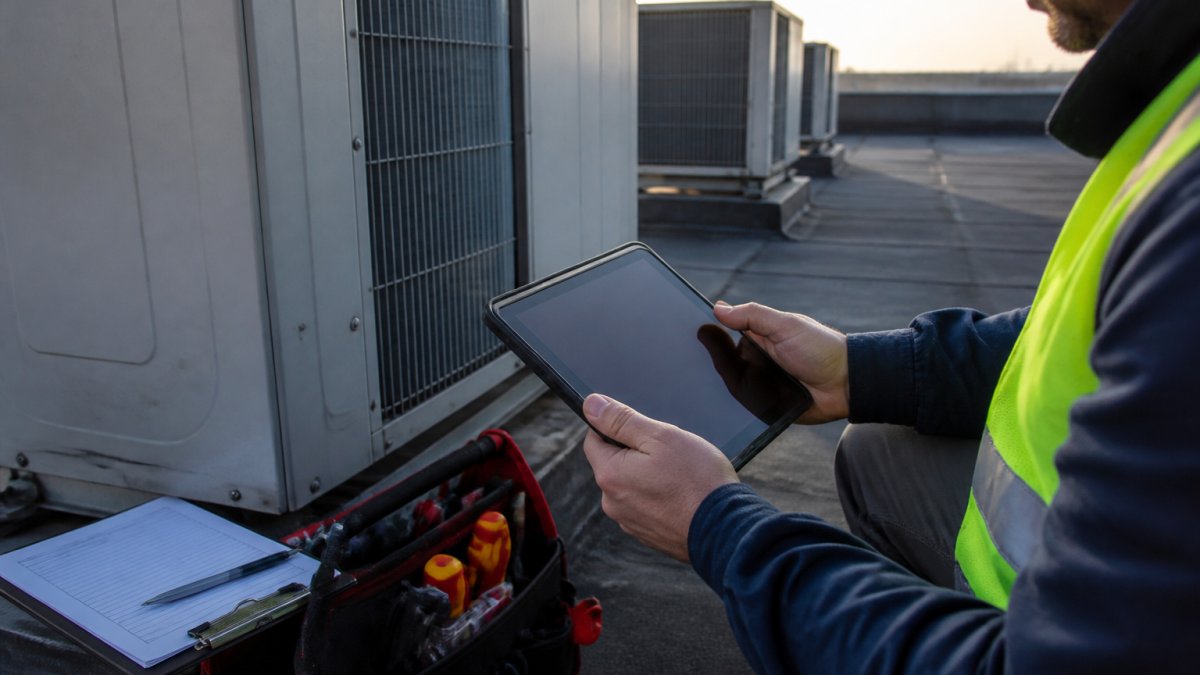
Mobile-first means:
- Submit, accept, and close work orders from a phone
- Capture photos and attach them to the record
- Scan asset tags or QR codes to pull up history on the spot
Offline field use is non-negotiable for industrial and healthcare sites: it keeps the record complete even when the network isn't.
Practice 6: Track Work Order KPIs with Defined Calculations
You can't improve a maintenance backlog you don't measure. Pick a small set of work order KPIs and define exactly how each one is calculated, so month-over-month comparisons mean something.
| KPI | Definition | What It Tells You |
|---|---|---|
| Completion rate | Closed work orders ÷ opened work orders in period | Whether work is keeping pace with intake |
| Mean time to repair | Total repair hours ÷ number of repairs | Technician efficiency and parts readiness |
| Backlog age | Days since each open order was created | Whether old work is quietly rotting |
| Planned maintenance ratio | Planned orders ÷ total orders | How much firefighting you're doing |
| First-time fix rate | Jobs fixed on first visit ÷ total jobs | Dispatch quality and parts accuracy |
| Schedule compliance | Jobs completed in window ÷ jobs scheduled | Whether your schedule is real |
Check these weekly, not quarterly. Rising backlog age is the earliest warning that intake is outpacing capacity; a dropping first-time fix rate usually means parts aren't being checked before dispatch.
Practice 7: Close the Loop with Documentation, Audits, and Compliance Records
A work order isn't done when the repair is done. It's done when the record is complete enough to survive an audit.
Closeout documentation should answer: what failed, what was fixed, what parts were used, who did the work, and when. For healthcare and regulated industrial sites, add permits, inspection sign-offs, and safety documentation. These records are your audit trail, and reconstructing them from memory never works.
Safety and Permit Documentation Belongs Inside the Work Order
The most common compliance failure in maintenance is treating safety paperwork as a separate binder. It isn't separate.
Build these into the lifecycle at the right points:
- At intake: flag hazards and access restrictions so triage can assign the right skill level and the right permits before anyone is dispatched.
- Before work begins: attach the hazard assessment and any required permit, such as a hot work permit, confined space entry permit, or energized electrical work permit.
- During the job: record lockout/tagout steps, including the energy sources isolated, the locks applied, and the verification method used.
A work order that triggers a rooftop repair should carry the fall-protection plan; one involving a chemical line should carry the isolation and lockout record.
Watch out: attaching permits after the fact defeats the purpose. If the permit isn't on the order before the technician starts, the order isn't ready to dispatch.
Run a Periodic Work Order Audit
Run a work order audit on a sample of closed orders each month. Pull ten to twenty at random and check for:
- Missing photos or vague completion notes
- Labor hours that don't match the scope of the job
- Permits or hazard assessments missing from jobs that required them
A light audit catches bad habits before they spread and gives you a concrete answer when an insurer, regulator, or client asks how you verify maintenance was performed correctly. Document the audit itself, what you sampled and what you found, so the audit trail has an audit trail.
Keep Records Retrievable, Not Just Complete
A complete record that takes three days to find is a liability. Store work orders so any closed order can be pulled by asset, location, date, or technician. Retention periods vary by industry, so confirm the applicable schedule with your compliance lead rather than assuming a default.
The test is simple: if a reviewer asked tomorrow for every work order touching a specific asset in the last two years, could you produce them in minutes? If not, the closeout practice isn't finished.
What Seven Work Order Management Best Practices Add Up To
Seven practices, one system. Standard intake feeds a scored priority. Priority drives dispatch. Dispatch protects planned maintenance. Mobile capture keeps the record honest. KPIs show where it's slipping. Closeout documentation proves it happened.
That's the part software alone can't deliver. The process is the product. If you're weighing tools against process, our comparison of work order management software for facilities shows where each fits.
Frequently Asked Questions
What should a work order include?
At minimum: a unique work order number, the asset or location, a plain description of the problem, the requester's name and contact, priority level, assigned technician, target completion date, and parts or labor needed. Add photos, safety permits, and a closeout signature for regulated sites. A consistent work order template means nothing gets chased down later, and asset history stays searchable when the same equipment fails again.
How do you prioritize maintenance work orders?
Score each request on three axes: safety and compliance risk, asset criticality, and business impact such as lost revenue or customer exposure. A leaking roof over electrical panels outranks a scuffed door every time. Publish the scoring rules so requesters stop escalating everything to urgent, and review the queue daily so planned maintenance does not get buried under reactive calls.
How do you improve work order completion rates?
Close the gaps that stall jobs: confirm parts availability before dispatch, give technicians mobile access to asset history and closeout forms, and require a completion note with photos. Track completion rate as closed orders divided by orders created in the same period, and review backlog weekly. Most stalls trace back to missing information at intake or a technician arriving without the right part.
How do you track work orders across multiple facilities?
Use one centralized system with a consistent site and asset naming convention so reports roll up across locations. Tag every order by site, asset, trade, and priority, then review a single dashboard for backlog, completion rate, and repeat failures.
Fragmented vendors and spreadsheets make every one of these practices harder than it needs to be. MKMaintX brings service bookings, asset tracking, and work records into one platform across 35+ states, so intake, dispatch, and documentation live in the same place. Solo operators and multi-site teams get the same centralized view. Get started with MKMaintX and turn your maintenance backlog into a managed schedule.